
This is a relatively complex thing to answer and hence to understand it, I will have to answer more than what the question asks:
Customer Data means all data, including all text, sound, video, or image files, and software, that are provided to Microsoft by, or on behalf of, the customer through use of the online services (Defender, Sentinel, Copilot, SPO etc). Customer Data doesn’t include ‘’Professional Services Data’ or information used to configure resources in these services such as technical settings and resource names.
Instead, Microsoft online services create system-generated logs as part of the regular operation of the services. These logs continuously record system activity over time allowing Microsoft to monitor whether systems are operating as expected.
So YES, Microsoft Security Copilot does store prompts and responses generated during user interactions. When a user interacts with Security Copilot, the following happens technically:
- Each prompt or instruction entered is processed within the organization’s own Microsoft cloud tenant.
- The generated response — along with the user’s original input — is stored as ‘customer data’ inside Microsoft’s secured cloud infrastructure.
- These stored items form part of what Microsoft defines as a “session,” which can be retrieved or referenced later by the same authorized users within that tenant for performing follow-up actions, generate summaries, and support collaboration features like shared investigations.
It is also important to note that Microsoft keeps all such data within Microsoft’s enterprise-grade service boundary, the same cloud architecture that underpins Defender, Sentinel, and other Microsoft security solutions. This means the data is:
- Encrypted both in transit and at rest using Microsoft-managed encryption keys.
- Isolated per tenant, ensuring that one organization’s Security Copilot data is never visible to another.
- Hosted within Microsoft’s data centres, adhering to the same compliance commitments that govern Microsoft 365 and Azure services (for example, ISO 27001, SOC 2, and GDPR).
While the answer to this is known to many, let us contemplate on it from a known/not-known perspective.
What is known:
- All session data (prompts, context, and outputs) is stored within Microsoft’s controlled cloud boundary, associated with the organization’s tenant.
- When a session is deleted via the in-product user interface, Microsoft marks the associated data as deleted and sets a Time to Live (TTL) of 30 days in the live (runtime) database. After the TTL expires, a background process purges the data.
- Although, the logs containing session data are not erased when a session is deleted via the UI. They are retained separately for up to 90 days. A good example of this is when you delete all the present SCUs in your Azure subscription.
- It is also well known that audit logs for Security Copilot’s activity (or any other Copilot’s user and admin operations) follow Microsoft Purview audit retention policies. By default, these audit logs are retained for 180 days unless an extended retention policy is applied to them.
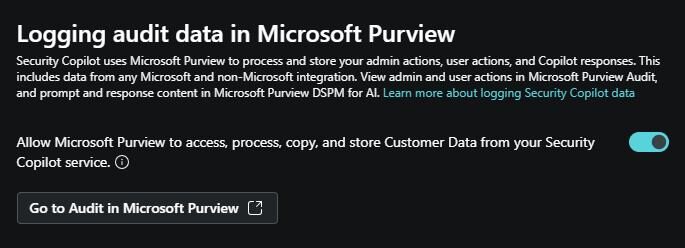
- To enable Purview for managing Security Copilot data (audit, retention, eDiscovery), the “Allow Microsoft Purview to access, process, copy, and store Customer Data from your Security Copilot service” option must be enabled.
What is less clear:
- It is not explicitly documented whether telemetry data (e.g. performance metrics, internal system behaviour) has different retention from session logs. Microsoft treats telemetry as system-generated logs (explained in the previous question) but does not publish a distinct retention window in the Security Copilot documentation.
- For plugin (extensions or add-ons for Copilot) and agent data, Microsoft does not explicitly state a separate retention period in publicly available documentation. The plugin actions (creation, deletion, enabling/disabling) however are captured in audit logs, which fall under Purview’s 180-day default audit retention.
I cannot limit this answer to only Security Copilot since every Copilot can respond with sensitive information, especially M365 Copilot. Coming back to the question, the answer is “yes but partially”. There is no filter or configuration to automatically “redact” sensitive information but yes there are mechanisms and settings that can be configured to block the upload/pasting of sensitive information in prompts as well as presenting any such data in responses that can prevent sensitive data types like PII, IP addresses, or secrets from being inadvertently processed or stored.
The above said mechanism is a commonly referenced strategy in Microsoft’s security and governance guidance where you can combine DLP policies (including eDLP), sensitivity labels, sensitive information types & other compliance tools from Purview to flag and/or block sensitive information when prompted as well as when presented in a response.
Another such mechanism can be using Microsoft Purview’s DSPM for AI “Risky AI usage policy” template that can help detect and block misuse of information — e.g. prompt injections or unauthorized access attempts to confidential materials. Again, this offers a guardrail but not guaranteed redaction.
Yes, we can (to an extent) and definitely should (to the most extent possible)! Security Copilot can do this based on the below three points that we all know but there are some important things to consider regarding them:
- We all know that Copilot uses on-behalf-of (OBO) authentication to access security-related data through active Microsoft plugins meaning it acts using the credentials and entitlements of the signed-in user. It cannot overstep or bypass those boundaries. But it is not really mentioned anywhere that the same applies on custom plugins as well. Meaning, if someone creates a custom plugin in the tenant’s instance, its either an allowed/not allowed permission. We cannot impose OBO model on custom plugins as far as we have seen.
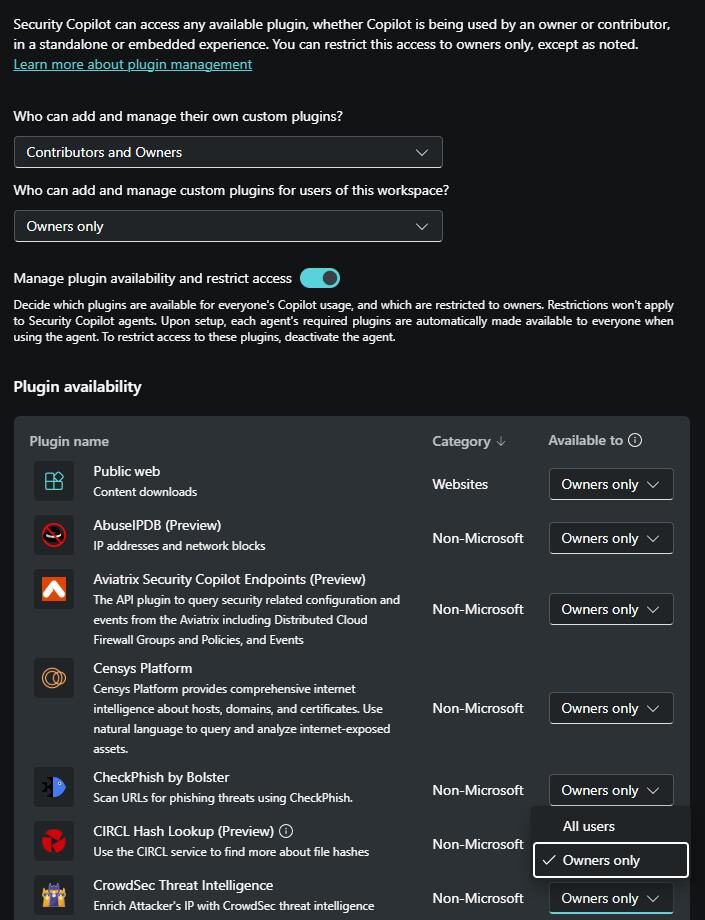
- Microsoft has explicitly stated that Security Copilot roles are not Microsoft Entra roles. The ‘Copilot Owner’ and ‘Copilot Contributor’ only provides access for performing respective actions on Security Copilot’s standalone and embedded experiences. But the thing to note is that the ‘Global Admins’ and ‘Security Admins’ by default becomes the ‘Copilot Owner’ in your tenant. You will also have to explicitly turn off the toggle to unmark all the users of your tenant from being a ‘Copilot Contributor’ to contain the scope of plugin management.
- While it’s true that Security Copilot lets us technically decide who can add, who can use, and whether a plugin stays active, there is no official “approval workflow” for every user using the custom plugin meaning that once a custom plugin is available to ‘Copilot Contributor’ users, there is no fine-grained role mapping to control what can those users query through the plugin. Talking about custom plugins, there is another question that has been asked a lot during customer conversations, that’s next.
For enterprises with a multi-vendor stack, it becomes crucial to ensure that Security Copilot can meaningfully interpret and correlate data from non-Microsoft sources when their schema, field names, formats, and enrichment vary.
We know that Security Copilot supports a plugin architecture which lets it access data sources. So, when a third-party telemetry feed is exposed via plugin, Security Copilot uses underlying language model (defined by Microsoft in the orchestrator) plus the plugin’s manifest logic to interpret what to fetch, where to look for it and how to ground and present it in the response.
This goes without saying that the normalization of the OOTB third-party connectors is vendor facilitated but the products that are not listed in the available list of connectors can mostly leverage their existing API schema (including URL, auth token and parameters) and connect to Security Copilot through the API format custom plugin.
As part of Inspira’s Security Copilot POC, we also assist customers in ingesting their custom source of data with Security Copilot.
A very important concept to understand and know about. There are particularly three verified access models (Azure Lighthouse, GDAP, B2B Collaboration) listed in the official documentation from Microsoft here. While you will find most of the relevant information in the link above, I’d just like to quickly weigh and summarize the feasibility of each of these models:
Ease of access provisioning:
Considering both the partner and the clients will be involved in this aspect, it becomes crucial to understand which access model makes this step easier and secure at the same time. In my opinion, the answer is ‘B2B Collaboration’. You can invite users of the MSSP to your tenant and provide them roles like ‘Security Operator’ or ‘Contributor’ through PIM which enforces time bound and approval-based access. While you can do the same in Azure Lighthouse as well, it’s not as simple as it is in B2B method. With GDAP on the other hand, you will have to create a security group and then provide privileged access to it.
Access Audit:
While it’s important to see which way is convenient for access provisioning, it’s even more important to know which way is most granularly auditable. The answer is obviously, GDAP! While Azure Lighthouse and B2B method both has their own way of auditing administrative activities, GDAP can audit every role assignment, access token issuance and activities performed under Entra ID sign-in logs, Unified audit logs and Partner Centre activity logs (which is not available for the other access models).
Governance:
This topic can go very deep on the ground level, and every MSSP & organization will prefer different aspects of governance as per their own IAM infrastructure. Hence, there is no one right answer here. For example, if you prefer identity isolation, B2B is not at all for you as you will have to create or invite guest users in your tenant. If you are someone who is concerned about lifecycle governance, you should definitely prefer GDAP over the other two as it is governed by same Entra RBAC model where data access is tightly aligned with assigned roles. You can prefer to go with Azure Lighthouse if you want an easy access scoping where access can be scoped to subscription, resource group and even at the workspace level.
Plugin Support:
Most important of all! Please have a look at the supported plugins for each of the access model:
Azure Lighthouse | GDAP | B2B Collaboration |
Microsoft Sentinel | Microsoft Entra (partial) | All plugins (Based on OBO) |
NL2KQL Sentinel | Intune | |
Defender XDR | ||
NL2KQL Defender | ||
Microsoft Purview |
If you and your organization really need to quantify the effectiveness of Security Copilot, we at Inspira can help you conduct a pilot that not just measures speed but also decision accuracy, workload reduction, consistency of triage, and how reliably Copilot converts raw telemetry into usable actions.
It’s not just about adopting a new solution; it’s about looking at the metrics that can truly answer whether AI can change the way your organization’s security operates today. There are certain indicators that you should observe in order to reach a verdict:
Ensure that Security Copilot is able to produce reliable and evidence-rooted summaries and recommendations to triage and contain incident in Sentinel/Defender.
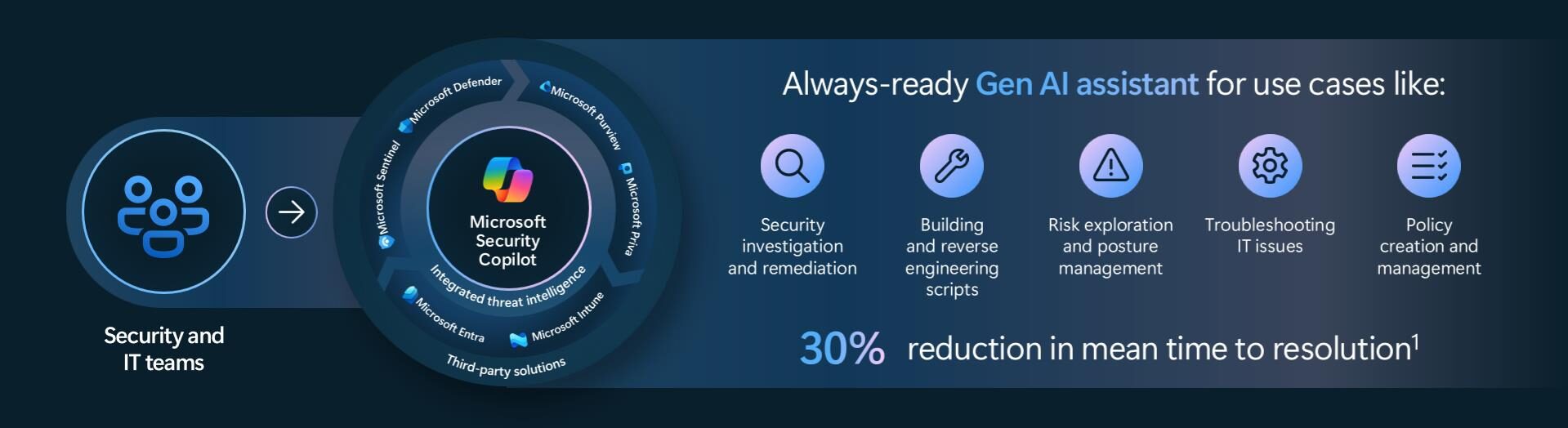
If Security Copilot is able to do the above, it should certainly translate in analysts handling more incidents than before and the MTTR should be dropped at least 30%.
Ensure Security Copilot can completely take over the manual and repetitive tasks like transforming logs, generating medium complexity hunting queries & documenting runbooks and incident summaries (based on the attack type).
Ensure to run multiple simulations of the same incident with different analysts of your organization to ensure most of them reach the same and the right conclusion with Copilot’s assistance and prove consistency in the Copilot’s response quality.